Separating stems: Which artifacts remain and how to fix them
Separating stems is now possible with just a few clicks: You load a finished song into a tool like SpectraLayers, iZotope RX, or directly into Cubase, and get back vocals, drums, bass, and the rest as individual tracks. However, the result is never perfect, because errors from the separation process remain in each of these tracks.
In this article, I'll show you which artifacts are typical, why they often only become apparent during processing, and what steps you can take to get rid of them. I'll also answer the crucial question: Is this material sufficient for a... Stem mastering or for a new MixAre you unsure about your song? Let's listen in a... mix analysis inside. Our glossary also explains exactly what the term means. Subgroups in music production.
Content
What artifacts are created when separating stems?
When separating stems, remnants of other instruments almost always remain in each track. This is often accompanied by a metallic or watery sound, muddy attacks, gaps in the background, and a permanently embedded reverb. This becomes especially noticeable when you drastically alter the balance. Fewer stems, a master bus test, and minimal adjustments are the most effective solutions.
Separating stems: What happens technically
A finished mix is a single file in which all instruments are tightly bound together. A separation tool then calculates which part of the mix likely belongs to which instrument. It can only make an estimate, as it doesn't have access to the original tracks.
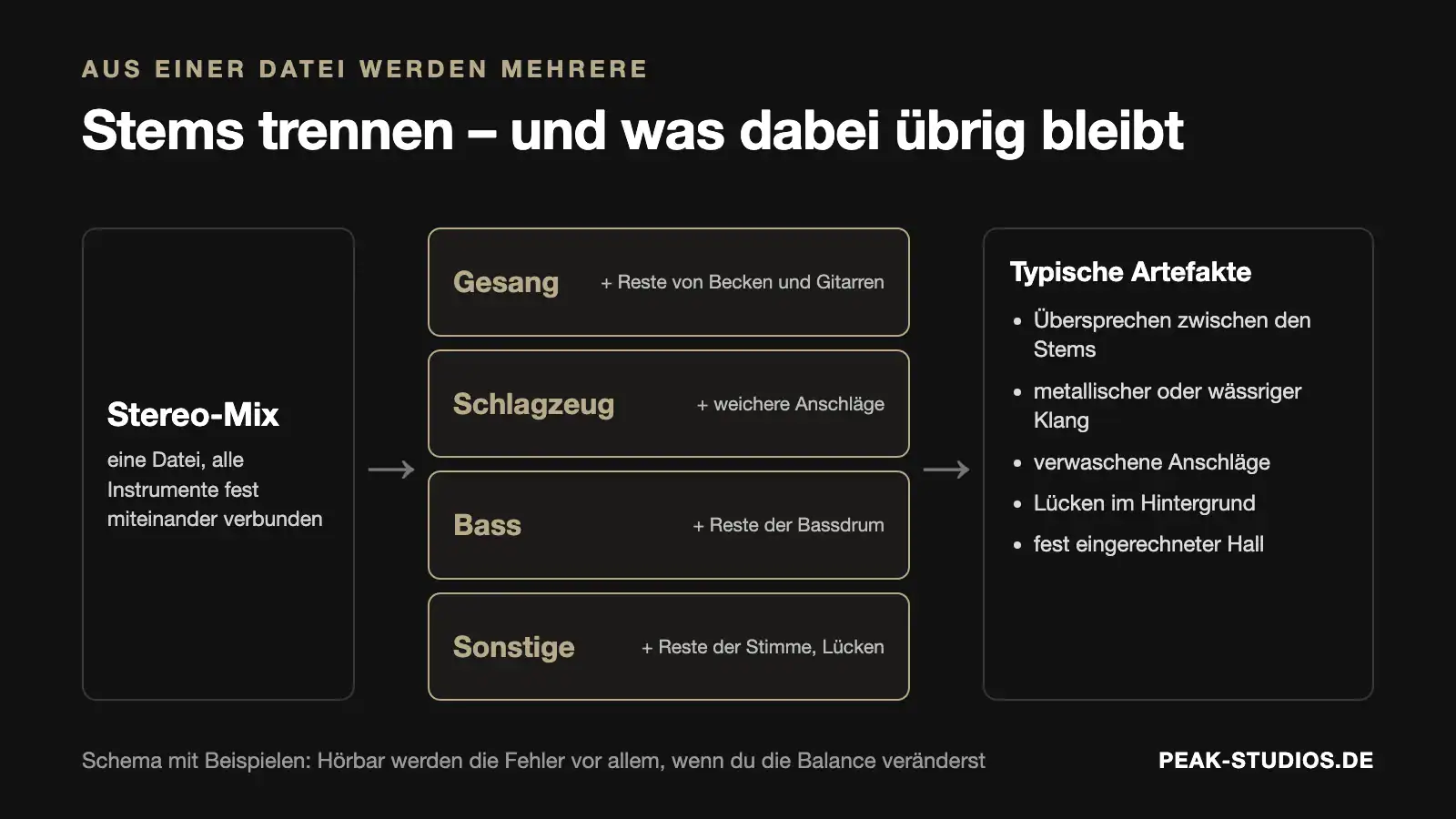
That's precisely why the result differs from true individual tracks. In a recording, each instrument is separate from the start. In contrast, with subsequent stem separation, many instruments share the same frequencies, and the software has to decide what belongs where. Where it errs, artifacts occur.
This applies regardless of whether the song originates from a studio or an AI. We've already covered this topic extensively for AI-generated songs, for example in the article about... Suno Advanced SplitTherefore, this is about separation in general.
Stems are separated using Cubase, SpectraLayers and similar programs.
There are three ways to separate stems today: directly in the DAW, in specialized software, or with freely available models. In our studio, we use Cubase and SpectraLayers. For all the programs mentioned here, I also checked the manufacturer and developer specifications as of November 22, 2026.
In the DAW: Cubase and Fender Studio Pro
The most convenient way to separate the tracks is directly within the project, because the new tracks are immediately in the right place.
| Program | Divide into | Good to know |
|---|---|---|
| Cubase Pro 15 | Vocals, Drums, Bass, Other | directly in the project via “Audio › Split Stems” |
| Cubase Pro 16 | additional piano and guitar | Selected tracks can be combined into one |
| Fender Studio Pro 8.2 | Since October 2026, also guitar and piano | The separation is firmly built into the program. |
The information comes from the Cubase Help from Steinberg and from the Fender's announcement regarding version 8.2.
Special software: SpectraLayers
SpectraLayers goes significantly further than a DAW. The program offers several separation modules that can also be used sequentially:
| Module | Divide into | Good to know |
|---|---|---|
| Unmix Song | Vocals, drums, guitar, piano, saxophone and brass instruments, bass, other | Three quality levels: Fast, High, Extreme |
| Unmix Drums | Kick, snare, hi-hat, cymbal | works on the drum level from Unmix Song |
| Unmix Chorus | Lead and backing vocals | works on the vocal level from Unmix Song |
| Unmixed Components | tonal components, transients, noise | It also helps with repairs later on. |
| Unmix Noisy Speech | Voice and loud background | intended for speech in front of street or engine noise |
| Unmix Multiple Voices | multiple speakers, also overlapping | needs short voice samples from the speakers |
The basis is the Manual for SpectraLayers Pro 11According to Steinberg, version 13 also received modules for two voices and for sounds such as wind, traffic or footsteps.
Free models: Demucs, Spleeter and Open-Unmix
Those who don't want to spend any money can also find freely available models. These originate from research and are therefore usually operated via the command line.
| Project | Divide into | Good to know |
|---|---|---|
| Demucs | Drums, bass, vocals, everything else; experimental model with guitar and piano | According to the developer, it is no longer being actively developed; the piano, he says, is not yet working well. |
| spleeters (Deezer) | 2, 4 or 5 tracks, with piano on request | Python library, very fast on a graphics card |
| open unmix | Vocals, drums, bass, rest | Reference model for research and sound engineering |
| Ultimate Vocal Remover | depending on the chosen model | A program with a user interface that bundles several models. |
However, free does not automatically mean freely usable. The code from Demucs Although it is under an open license, the license of the trained models is unclear, according to the developers. open unmix The standard model is only licensed for non-commercial use. Therefore, please check this before publishing any results.
Besides these, there are other programs and online services, such as iZotope RX. However, the errors we are discussing are not related to a specific program, but to the process itself.
Stems separate: These five artifacts remain
If you listen to a single track on its own after separating the stems, you'll usually notice immediately that something is wrong. It's typically one of these five problems, often several at once.
1. Crosstalk: Residue from other instruments
Because instruments share frequency ranges, remnants of other tracks get trapped in the supposedly clean stem. In vocals, for example, you might still hear cymbals, or in instrumentals, a shadow of the voice. This crosstalk is also called bleed.
2. Metallic or watery sound
Small errors occur during the separation process. The sound becomes tinny, watery, or slightly indistinct. In quiet passages, a warbling effect is also frequently present. This is particularly noticeable with vocals and in the higher frequencies.
3. Blurry attacks
The crisp attack of the kick and snare drums also suffers. transients They sound softer, and as a result, the drums lack punch.
4. Gaps in the background
If you remove an element from the foreground, a complete background doesn't always remain behind it. Steinberg describes this themselves: SpectraLayers 13 has a dedicated module that fills in such gaps in surfaces and atmospheres.
5. Fixed built-in reverberation
Reverb and other effects are already included in the mix and are therefore also incorporated into the stem. reverb It is therefore tied to the voice and can no longer be freely shaped.
Sum test after stem separation: Why you only hear artifacts when intervening.
This is the most important point when it comes to stem separation. The SpectraLayers manual states, in essence, that the separation modules do not destroy anything: "the sum of all unmixed layers is equal to the original layer." Together, all layers therefore recreate the original.
This leads to something very practical. What's too much in the vocal stem is missing in the instrumental, and vice versa. As long as all tracks are running together in their original proportions, the errors cancel each other out. Only when you make a track louder, quieter, or mute it do the errors become audible. So, the more you intervene, the more you hear the separation.
Therefore, a short test is recommended before any editing:
- Place all stems into the project without effects and with unchanged levels.
- Listen to the sum alternately with the original. If it sounds thinner or hollow, something is wrong.
- Reverse the polarity of the original and play it back together with the sum. If only silence remains, the separation is complete. Our article on this topic shows how to do this. Zero test.
Not every tool passes this test. If a piece is left over, something is missing during assembly, and then you should also check... Phase shifts and the Mono Compatibility respect, think highly of.
Just a stereo file – and you don't know what else you can do with it?
Disconnecting stems without hassle: seven steps to combat artifacts
You can avoid most problems even before you start working on them. That's why the three most important rules are at the beginning.
Before the stem split: three rules
- As few stems as necessary. Every additional track reduces quality. If you only want to control the vocals against the music, two tracks are sufficient.
- Choose the best quality level. SpectraLayers offers three levels for Unmix Song. According to the manual, Extreme calculates in four passes and takes four times as long.
- Do not send anything through the separation process twice. A stem that has already been separated is already damaged. Using a second tool therefore usually makes it worse. This is different for tiered modules like Unmix Drums, which are specifically designed for the drum layer.
On the single track: four corrections
- Combat crosstalk only where it is disruptive. Often one is enough Equalizer, which lowers the area of residues, or a Noise Gate for the breaks. SpectraLayers also has a module called DeBleed, which, according to the manual, reduces crosstalk between layers.
- Lower the metallic parts slightly. Find the one or two frequencies where it sounds tinny and attenuate them selectively. Sharp sibilances are captured by... De-Esser .
- Carefully reverse the attacks. A transient designer gives the kick and snare back their definition. Too much of it, however, quickly sounds clicky.
- Conceal rather than remove the hall. A de-reverb only partially reduces the reverb. Often, a separate, suitable reverb that masks the old one works better.
The rule of thumb for every repair
The same rule of thumb applies to all repairs: only remove as much as is necessary so that it no longer interferes with the overall sound. Trying to remove all traces completely will make the sound dull and lifeless. You can find more information about the tools required in the glossary. Audio restoration and in the article about Noise in the mixAnd our guide shows you in detail what the steps for AI songs look like. Suno stems mix.
Restoration after stem separation: Tools in detail
If the above steps aren't sufficient, the actual restoration begins. There are two approaches: You can either directly address the fault in the spectrogram, or you can treat the entire track with plug-ins.
In the spectrogram: SpectraLayers
SpectraLayers displays each layer as a spectrogram. Therefore, you can edit a residual noise precisely where it occurs, instead of filtering the entire track. The manual describes these tools and modules for this purpose:
| Problem | tool or module | What it does |
|---|---|---|
| The rest is on the wrong level | Transfer | moves content from one layer to another without loss of quality |
| single interference tone | Eraser | weakens the contents under the brush |
| Crosstalk between levels | DeBleed | It lowers with adjustable sensitivity. |
| Hole after removal | Reconstruct (from version 13 onwards) | reassembles tonal components, transients, and noise in the selection. |
| Gap in the background | Ambience Heal (from version 13 onwards) | fills holes in surfaces and atmospheres |
| too much reverb | DeReverb | reduces the reverberation level |
| Hissing, crackling sounds, popping noises | DeNoise, DeEss, DeClick | reduce the respective background noise |
| The sound doesn't match the rest of the sound. | EQ Match, Reverb Match, Ambience Match | match timbre, reverb, or atmosphere to a template |
The transfer tool is particularly valuable after separating stems. For example, if a cymbal ends up in the vocal section, you simply move it to the drum section. Because nothing is lost in the process, the overall mix remains correct.
With plug-ins: noise reduction and taming resonances
For entire tracks, we use two tools that we already frequently use in our studio. iZotope RX 10 first learns a noise profile with Spectral De-noise and then subtracts it. Soothe2 from oeksound, on the other hand, continuously detects resonances and automatically attenuates them, which is useful for metallic-sounding passages.
However, the repair process itself also creates its own artifacts. The RX manual, for example, describes how a precise but harsh adjustment can leave a chirping sound, and how excessive attenuation can damage quiet signal components. The manufacturer of the soothe2 also warns of artifacts if the notches are set too sharply. Therefore, the rule here is even more important: as little as possible.
No special tools required: three solutions
- Lower the volume instead of muting it. As long as a remnant of the other track is running, many errors remain hidden. Therefore, only backtrack as far as necessary.
- Only address the problem area. If the vocals are only disruptive in one verse, stem separation for that section is sufficient. SpectraLayers, on request, separates only the currently selected track.
- Replace instead of repairing. A broken drum kit, for example, can be repaired with samples. A vocal track, on the other hand, can be re-recorded. This often takes less time than spending hours patching things up.
Caution is advised when combining recordings. If you take the vocals from one program and the instrumental from another, the two together will no longer be the original. This also means you'll miss out on the master bus test for verification. You can find further basics on repairing recordings in our article. audio restoration.
QUESTIONS ABOUT YOUR MATERIAL?
Briefly describe what you have and what you intend to do. We usually get back to you within 3 hours (Monday to Friday).
- Personal point of contact
- Over 20 years of experience
- Highest quality standards
You can reach us by phone from Monday to Friday from 9 a.m. to 8 p.m.
After separating the stems: Is that enough for stem mastering or a new mix?
Whether the material is sufficient after stem separation depends primarily on how much you want to intervene. The sum test from above explains why: Small corrections remain hidden, large ones reveal the errors.
| Project | Is separation enough? | What matters |
|---|---|---|
| Singing a little louder or softer | Mostly yes | minor change, errors remain largely hidden |
| Stem mastering with two to three groups | often yes | The overall mix must be balanced; interventions will remain moderate. |
| Own voice over an existing instrumental | with limitations | Traces of the old voice may still shine through. |
| Instrumental or pure vocals on their own | with limitations | One clue is completely missing, mistakes are obvious |
| Complete new mix | rare | For that you need the actual individual tracks. |
What this means for stem mastering and mixing
We've already worked with this kind of material during stem mastering. For example, on an AI album, we processed the vocals and instrumentals separately, instead of just making the stereo file louder. You can read more about it in the article. AI-controlled music masteringIt's important that all tracks start at the same point, are the same length, and together create your mix. The exact requirements are outlined in the comparison. Stem vs. Stereo.
For a completely new mix, however, if you have access to the original project, it's best to export the actual tracks. The instructions explain how to do this. Export stemsAnd if you want to sing along to an existing instrumental track, this article will help you. Original vocals on AI songs continue.
Conclusion: Separating stems is fine – but with moderation.
Stem separation is a powerful tool when the original tracks are missing. However, it doesn't provide true individual tracks, but rather a good estimate. Therefore, only separate as many tracks as necessary. Check the sum against the original and only fix what is truly problematic in the overall mix. This is often sufficient for minor corrections and stem mastering, but rarely for a completely new mix.
If you want to make such decisions confidently on your own, we work in Teaching and coaching directly on your material. You can also learn more about me and my work on my profile page.
The article explains which step your song is fundamentally missing. Mixing or mastering.
Frequently asked questions about stem splitting
Is it possible to break down a song into tracks without any artifacts?
No. The tool estimates which part of the signal belongs to which instrument, and is never completely accurate. However, the fewer tracks you request and the higher the quality level, the smaller the errors will be.
Into which tracks does Cubase divide a song?
According to the help documentation, Cubase Pro 15 categorizes audio into vocals, drums, bass, and other. The help documentation for Cubase Pro 16 adds piano and guitar as additional categories. You can find this function in the Audio menu.
Why does a single track sound worse than the whole song?
When played together, the errors mask each other. If you listen to a track in isolation, this masking is missing, and therefore remnants, metallic sounds, and soft attacks become clearly audible.
How many tracks should I remove from a mix?
As few as necessary. If you only want to control the vocals, vocals and instrumental tracks are sufficient. Every additional track introduces more crosstalk and artifacts.
Are there any free programs that can break a song down into tracks?
Yes. Freely available options include Demucs, Spleeter, and Open-Unmix, as well as Ultimate Vocal Remover, a program with a user interface. However, check the licensing of the models before publishing or selling any results.
Can I send tracks created later for stem mastering?
Yes, provided they combine to create your exact mix, start at the same point, and are the same length. However, the actual groups from the project are always better, if you still have access to them.