
Comb filter effect: why two identical signals sound hollow together

Two microphones on the same guitar, a voice at a table, an effect applied alongside the original – and suddenly everything sounds hollow and thin. This is almost always due to the comb filter effect. This article explains how it occurs, how to recognize it, and how to avoid it during recording and mixing.

The comb filter effect occurs when a signal is summed with a slightly delayed copy of itself. Certain frequencies are then amplified, while the frequencies exactly in between cancel each other out. This creates a pattern of peaks and notches at regular intervals in the frequency response, resembling a comb. The sound becomes hollow, muffled, or thin.

What is the comb filter effect?

The comb filter effect occurs when a signal interacts with a slightly delayed copy of itself. At some frequencies, the two signals reinforce each other, while at others they cancel each other out. This results in alternating peaks and notches in the frequency response at regular intervals. The pattern resembles the teeth of a comb, hence the name.

To the ear, the result sounds hollow, muffled, or thin. In audio engineering, this effect is therefore usually undesirable, for example in... Recording with multiple microphones. However, as a stylistic device, it is also found in effects such as the Flanger.

How does the comb filter effect occur?

The crucial factor is the delay between the original and the copy. Frequencies whose oscillation period exactly matches the delay coincide and are therefore louder. The same applies to their multiples. Frequencies exactly in between, however, coincide in opposite directions and cancel each other out.
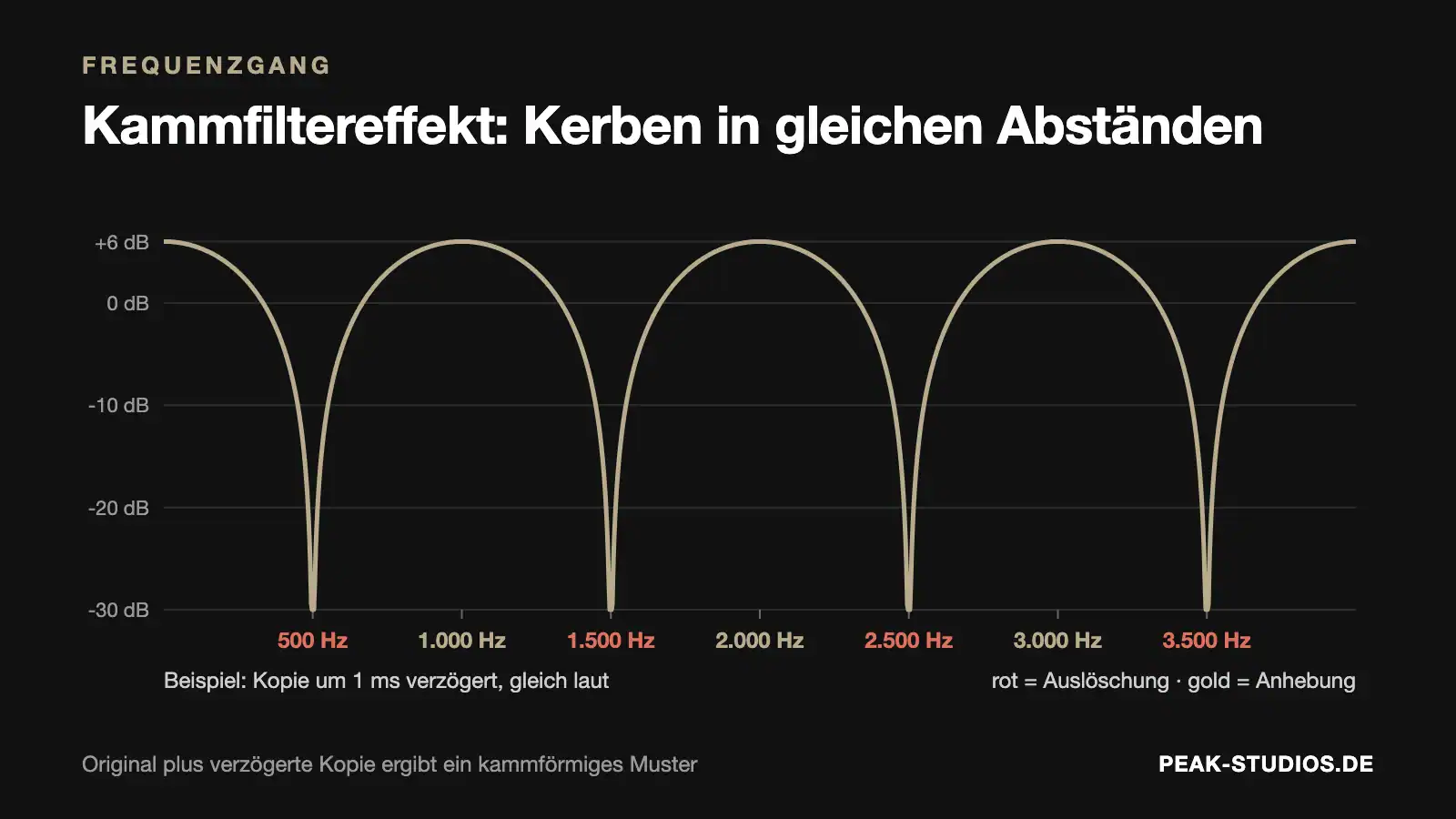
Comb filter effect in the frequency response: cancellations and boosts at equal intervals with a 1 ms delay
Comb-shaped frequency response when a signal is summed with a copy delayed by 1 ms and of the same volume.

A numerical example makes this tangible. With a 1-millisecond delay, the peaks occur at 1.000, 2.000, and 3.000 Hz, and the dips consequently at 500, 1.500, and 2.500 Hz. Sound travels approximately 34 centimeters in this time, because the Speed ​​of sound in air The speed is approximately 343 meters per second. Therefore, even a small difference in path length between two microphones is sufficient.

Furthermore, the shorter the delay, the further apart the notches are. The quieter the copy is compared to the original, the weaker the comb filter effect.

Where the comb filter effect occurs in the studio

In practice, delayed copying almost always occurs unintentionally. These five situations are particularly typical:

SituationWhere the delay comes from
Two microphones at one sourceOne microphone is closer than the other, so the sound arrives with a time delay.
Reflection from floor, wall or tableThe reflected sound arrives at the microphone shortly after the direct sound.
Effect parallel to the originalThe effects unit or plug-in slightly delays the signal.
Copied track, slightly shiftedThe duplicate no longer lies exactly on top of the original.
Stereo is summed to mono.The time differences between left and right collide.

Reflections are characterized by delays between 2 and 15 milliseconds. Short signal paths to a tabletop or floor fall precisely within this range. Our glossary also explains why stereo signals change to mono. Mono Compatibility.

What does the comb filter effect sound like?

A typical characteristic is a muffled, hollow sound lacking fullness and clarity. The coloration becomes particularly noticeable as soon as the sound source moves. Then the notches traverse the spectrum, and the sound character changes audibly, for example from "u" to "ü" to "i".

This is especially noticeable with speech. For example, if you speak into a microphone at a hard table, you'll pick up the reflections from the tabletop. This is a common source of errors in podcasts. That's why microphone positioning is one of the fundamentals covered in our guide. Create a podcast.

It's also interesting to note that the ear largely filters out natural reflections in everyday life. Electrically generated superpositions, on the other hand, are significantly more disruptive. This principle is ultimately used in modulation effects: A flanger modulates a very short , delay and causes the notches to migrate.

Avoid comb filter effect during recording

The cleanest way to solve the problem is directly at the source. Four methods have proven effective for this:

  1. Observe the three-to-one rule: The second microphone should be at least three times as far away from the first as the first is from the sound source. This will make the sound from the source significantly quieter at the second microphone.
  2. Keep your distance from hard surfaces: Tabletops, floors, and nearby walls reflect a lot of light. More distance or a soft surface can reduce reflections.
  3. Use fewer microphones: Each additional microphone at the same source is a possible delayed copy.
  4. Listen in mono: Listen to a short test recording in mono. This way you'll immediately recognize the problem.

The three-to-one rule However, this is only a rough rule of thumb, as it doesn't take into account the volume of the instruments or the directionality of the microphones. Ultimately, the ear remains the deciding factor. Our article also demonstrates how much the room acoustics affect the sound. Small space, great acoustics, and the article collects further pitfalls about The most common mistakes in home recordingThe distance to the microphone also changes the bass response, as explained in our glossary. proximity effect shows.

Fix comb filter effect in the mix

If the recording is already finished, a Equalizer Only to a limited extent. The notches are numerous and narrow, and what has been erased cannot be recovered. Therefore, these steps are more effective:

  1. Align tracks in time: Move one of the two tracks until the stops are aligned.
  2. Try rotating the polarity for testing purposes: If the total sounds fuller after that, the trail was unfavorable.
  3. Make it a bit quieter: The greater the level difference, the weaker the cancellation.
  4. Check the latency of parallel effects: The effect path must not be delayed compared to the original.

Our glossary explains the background to this. Phase ShiftWhether two tracks are truly identical is also shown by the Zero testInstead of copying a vocal track, it is almost always worthwhile to record it a second time.

Conclusion: First the distance, then the mix

The comb filter effect isn't a device malfunction, but simple physics: the original plus a delayed copy results in cancellations. Anyone aware of this should therefore pay attention to spacing and hard surfaces during recording and listen in mono. In the mix, timing, polarity, and level then help. Those who prefer to record in a pre-treated room can also find more information in our [section/resource - context needed]. recording studio in Wuerzburg and in the Recording studio in Berlin correct.

Does your mix sound hollow or thin?

You suspect deletions, but can't find the cause?
👉 Request a mix analysis from Peak-Studios now!

Upon request, we can also handle the entire online mixing – including aligning the tracks.

FAQ – Frequently Asked Questions about the Comb Filter Effect

When a signal encounters a slightly delayed copy of itself, some frequencies cancel each other out and others become louder. This makes the overall sound hollow or thin.

Very little indeed. At 1 millisecond, the first notch is at 500 Hz, right in the middle of the audible range. This corresponds to a path difference of approximately 34 centimeters.

If the two microphones are positioned at different distances from the guitar, the same sound arrives at different times. This results in cancellations when mixing the sound together. This can be remedied by increasing the distance between the microphones or adjusting the alignment of the tracks.

Hardly. The notches are numerous and narrow, and the canceled-out components are missing from the signal. It is therefore better to eliminate the delay itself or to reduce the volume of one of the two tracks.

A flanger uses the same principle as an effect. It mixes a very short-delayed copy with the original and continuously changes the delay. This causes the notches to move across the spectrum.