
Soft Clipper
A soft clipper limits the peak levels of an audio signal by gently rounding off the waveform above a threshold instead of clipping it abruptly. The result sounds more musical than hard clipping because the resulting harmonics are harmonious. In mastering and mixing, it is used selectively to control transients and increase the perceived loudness.
A soft clipper is often used in music production, mixing, mastering and broadcast workflows. This article explains what soft clipping does, when it is useful and how it affects loudness and distortion.
What is a Soft Clipper?
A soft clipper is a hardware processor or audio plugin that gently rounds the peaks of an audio signal once they exceed a chosen threshold. Unlike hard clipping, which cuts peaks abruptly, soft clipping creates a smoother and often more musical form of distortion. It is used in music production, mastering and broadcasting to control peaks, increase perceived loudness and shape tone without creating harsh artifacts. Soft clippers can be standalone processors, DAW plugins or built-in functions in audio tools, usually with parameters for threshold, drive, output level and clipping character.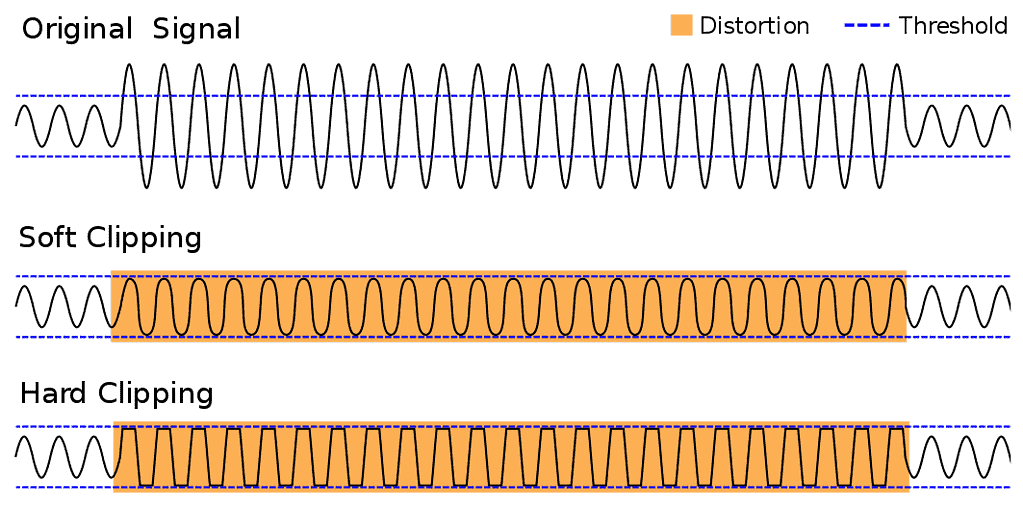
Benefits of soft clipping
Soft clipping is a controlled way to add saturation or distortion while avoiding the hard edges and unpleasant artifacts of hard clipping. It is a flexible tool for mixing and mastering engineers because it can shape transients, add density and help a track feel louder without simply pushing a limiter harder.
Smoother transition: signal peaks are rounded more gradually when they exceed the threshold, creating a smoother transition between clean and saturated signal.
Better dynamic control: compared with hard clipping, soft clipping can preserve more of the signal’s dynamic feel while still controlling loud peaks.
More natural sound: soft clipping is often perceived as warmer and more musical than hard clipping, especially when only a small amount is used.
Versatility: it can be used in production, mixing, mastering, broadcast and live sound to shape, smooth or optimize signals.
Digital processing: in plugins and DAW tools, soft clipping can be adjusted precisely with parameters such as threshold, drive and output level.
Competitive loudness without harsh clipping?
Where soft clippers are used
A soft clipper can be used in many audio-production workflows: to shape tone, control peaks, create saturation or optimize material before mastering. Typical applications include:
- Saturation in music productions: Clipping can be used to add edge and character to guitar, bass or synthesizer tracks. It is common in genres such as <a href="https://www.peak-studios.de/en/mixing/rock-mixing/">rock</a>, metal and <a href="https://www.peak-studios.de/en/mixing/edm-mixing/">electronic music</a>, where more aggressive or distorted sounds are part of the production style. , rock, metal or electronic music used to create more aggressive and distorted sounds.
- Volume limitation and dynamics control: In broadcast, recording and mix situations, soft clipping can limit the maximum level of an audio signal and reduce overload. This helps control dynamics while keeping the signal inside a usable level range.
- Volume control and mastering: In mastering, clipping can increase perceived loudness and prepare a signal for release. Used carefully, it can help a master sound consistent across playback systems without relying only on heavy limiting.
- Sound shaping and sound design: Soft clipping can also shape frequency areas and transients, for example by making low-end hits denser or smoothing sharp high-frequency peaks. This can give a signal a more defined character.
- Effects editing and sound design: In sound design and film scoring, clipping can create special effects, distorted textures, irregularities and artifacts that support a specific mood or atmosphere.
- Correction of recordingsIn some cases, recordings contain unwanted peaks or overloads caused by loud passages or technical problems. Clipping tools can reduce these peaks and help create a cleaner, more even recording. recording session .
- Signal optimization for live sound: In live sound, clipping control can help limit microphones, instruments or the full mix so the system remains stable and the audience hears a consistent sound.
- Sound experiments and creative effects: Clipping can also be used for creative sound experiments and effects to create unconventional and unique sounds. By selectively overdriving signals, interesting textures, rhythms and atmospheres can be created that can be used in music production, sound design or electronic art.
- Audio Restoration and processing of historical recordings: When restoring historical recordings, clipping tools can help reduce heavily distorted or damaged peaks. Used carefully, this can improve perceived quality and make older material easier to listen to.
- Loudness normalization and streaming optimization: Clipping can also be used in music production and mastering to normalize the loudness of recordings and make them suitable for various playback devices Optimize streaming platforms. This helps ensure audio sounds consistent and competitive across different platforms.