
Mastering: Technical and creative boundaries between mix and master
Understanding mastering on a new level
Mastering is often described as the "finishing touch" of a song. But what does that really mean? Many beginner's articles explain What is mastering? greatly simplified – here we go deeper.
This article is aimed at ambitious amateurs and professionals who want to learn more about the technical and creative limits in mastering want to deal with.
After reading you will know:
✅ How to spot mix errors before mastering
✅ Which tools and methods really work in mastering
✅ How a stereo master differs from stem mastering
✅ Why your track sometimes sounds quieter after mastering than before
Let's get in!
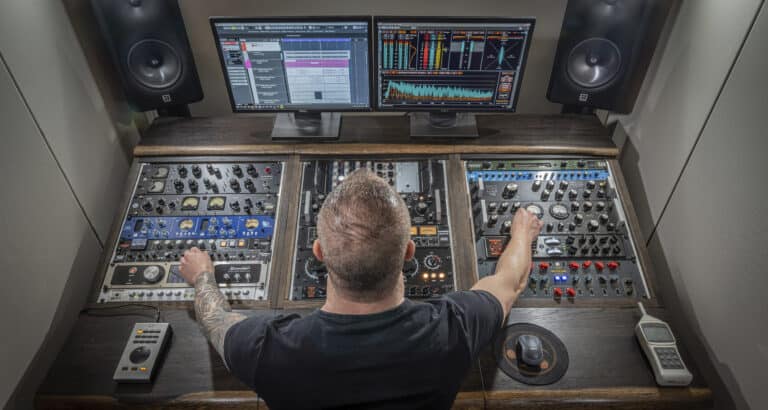
The transition from mixing to mastering – what exactly does “mix error” mean?
Typical reasons for mix problems
A clean mix is the basis for a successful Audio masteringHere are the most common Mix errorwhich are difficult to correct later:
❌ Unfavorable volume ratio – Leads are too loud, backing vocals are too quiet.
❌ Unbalanced frequency distribution – Excessive bass or muddy mids.
❌ Poor stereo balancing – Elements are placed too far to the left or right.
❌ Dynamic problems – Overcompression or uncontrolled peaks.
Mastering can fix a lot, but not everything — where the limits lie and how to prepare the mix workflow is shown in the article. Mastering Guide.
Why the right gain staging is crucial
A good gain staging ensures a clear sound and prevents distortion in the Mastering for streaming. Pay attention to:
✔ headroom retain – Recommended are -6 dBFS Peakto avoid clipping.
✔ Correct export - At least 24-bit WAV, never MP3!
✔ Clean tracks – No unnecessary noise or uncontrolled effects.
When should you return to the mix?
Use this checklist before you start your project mastering hand over:
☑ Are the volume levels correct?
☑ Does the stereo image sound balanced?
☑ Are frequencies clear and defined?
If not: Back in the mix or test our Online mixing services.
Do you want to know if your mix is balanced and harmonious?
Mastering is more than just loudness
Many think mastering just means to make the track louder and want high LUFS-values to be achieved Wrong! Here are the real core tasks:
Loudness vs. Dynamics
Streaming platforms normalize the volume (e.g. Spotify -14 LUFS). More information: Itunes, YouTube, Spotify and co. – This is what your song should be like.
If you limit too much, you lose dynamics – and sounds worse than the competition.
🔹 Why does my track sound quieter after mastering?
Because streaming services LUFS vs. RMS evaluate differently!
Frequency balance in mastering
A EQ in mastering does not make any radical interventions, but serves the fine adjustment:
✅ Broadband EQ adjustments for a natural frequency balance.
✅ Corrections for different playback systems (Club sound vs. streaming).
Stereo image and spatiality
✔ Mid/Side techniquesto specifically adjust width or mono components.
✔ mono compatibility improve in masteringso that the track also sounds good on club systems.
Mastering for different formats and platforms
CD vs. Streaming vs. Vinyl
Not every platform has the same requirements:
CD: Can be mastered louder as there is no loudness normalization.
streaming: Pay attention to the level, otherwise your track will be turned down.
Vinyl: Special EQ adjustments required to avoid distortion.
Multi-platform strategy
A single master for all formats? Not ideal. Best practices:
Spotify & Apple Music and co.: Target: As loud as it sounds good. Check the conversion codecs (AAC, Opus, etc.)
Club Mastering: More punch, adapted to PA systems.
Vinyl master: Careful bass and dynamic control.
You don't want to compromise on sound? We'll take your sound to the next level!
Limits of stereo mastering – and when stem mastering makes sense
Why can't a stereo master fix everything?
❌ Adjust individual instruments? Not possible.
❌ Reset stereo panning? Only works in a mix!
❌ Reduce reverb? Only limited with de-reverb tools.
Yesterday kommt Stem mastering in the game.
What is stem mastering?
At the Stem mastering Instrument groups (e.g., drums, vocals, synths) are processed separately. This provides more control.
When is it worth it?
✅ For complex productions with many details.
✅ If you want to specifically influence the Mastering for club music vs. streaming want to take.
Best practices & workflow tips for perfect mastering
Communication with the mastering engineer
🔹 References delivery: Example tracks help enormously!
🔹 Use feedback loops: A good engineer will give you tips for mix corrections. See also: This is how you give proper feedback during mixing and mastering.
A/B checks with reference tracks
🎧 Compare your song with professionally mastered tracks in the same genre.
🎛 Use studio monitors or neutral headphones for realistic assessments.
Organization & File Management
(I.e. Clean file naming: Specify song name, BPM, sample rate, bit depth.
🕒 Time planning: Leave enough room for corrections.
Would you like to know what your song will sound like after professional mastering?
Practical example: A song is mastered
1. Initial situation:
Genre: Electronic track with powerful drums.
Problem: Highs too sharp, bass somewhat undefined.
2. Mastering chain:
🔹 analysis Tools for frequency and loudness measurement.
🔹 EQ in mastering for subtle corrections.
🔹 Compression & Limiter for loudness control.
🔹 saturation for additional analog character.
3. Before and after comparison
🎧The track sounds punchier, more transparent, and clearer—without overcompression!
mastering is more than just “making it loud” – it’s about fine-tuning, balance and sound aesthetics.
👉 Want a mix analysis? Write to us and get professional tips to take your mixing and mastering to the next level!
YOUR CONTACT TO PEAK-STUDIOS
Send us a message - we usually reply within 3 hours on working days.
- Personal point of contact
- Over 20 years of experience
- Highest quality standards
You can reach us by phone from Monday to Friday from 9 a.m. to 8 p.m.


Frequently asked questions and misunderstandings in mastering
❓ Can a mastering engineer remove disturbing artifacts?
✅ Yes, but only to a limited extent (de-noising, de-clicking).
❓ Can you reduce the amount of reverb in my mix?
✅ Only limited – better to optimize directly in the mix.
❓ Why does my track sound quieter after mastering?
✅ LUFS in mastering and streaming normalization are the cause!